Building a CI/CD Pipeline to solve a network control issue
As I was working on my automated disaster recovery processes, I realized I had two main problems to solve, one in the cloud and one on premise. The on-premise issue is one of a lack of failover and redundancy when it comes to network control services, specifically dhcpd and radiusd.
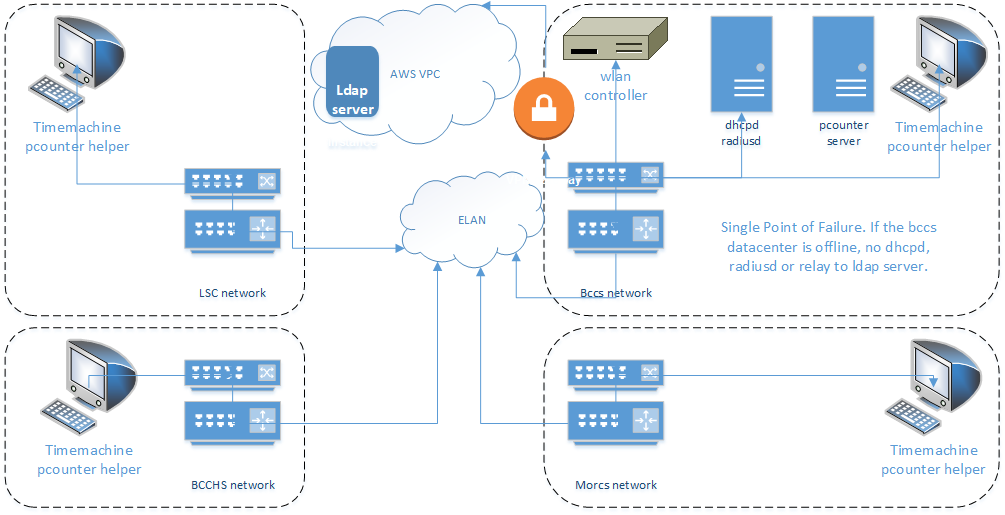
This set up made sense at the time because the critical systems could be managed from a central location by one person on a single machine, rather than investing in hardware that would be distributed and managed by personnel at each site. I had me a special pet server, and with webmin we manually configured and lovingly administered that little snowflake into one big ol' single point of failure.
Time to butcher this pet and start farming cattle...
One of the school sites is moving to a new building, so we have an opportunity to rethink how the network is designed as well as integrate more updated technology paradigms such as infrastructure as code, containerization and continuous integration / continuous delivery. By adding Docker to each of the timemachine servers, we would be able to automate deployment of changes to the services (such as new dhcp static ip reservations), as well as add a bit of failover by having ip-helper directives at each router point not only to the local control server, but also to a failover server.
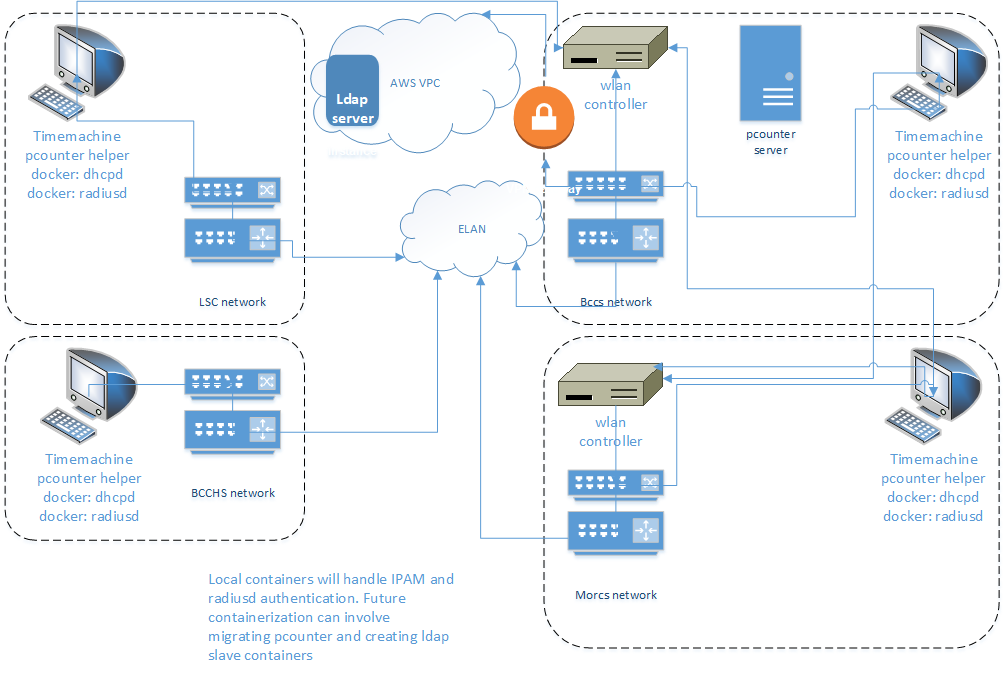
The next step will be to integrate a CI server (a Jenkins container with a persistent store) and build pipelines for each package. Changes to configuration will be written to the organization's CodeCommit repository, and build triggers set up to automatically build and deploy the changes to the local timemachine containers. The container has been deployed, and each of the timemachines are set up as jenkins build agents. Time to build that pipeline...
Adding the time machines as jenkins build slaves was very easy, once I had pushed the ssh key to each of the clients and added the key to my Jenkins credentials. Under the Jenkins / Manage Jenkins / Manage Nodes / New Node menu I added the time machines as build slave nodes and launched the agent. I added a distinct label for each node and set the usage to "Only build jobs with label expressions matching this node." One little wrinkle I did not expect was the need to copy the the .ssh/known_hosts file to the jenkins_home directory in order to use the Host Key Verification Strategy.
As a test pipeline, I will build a freestyle project for the radiusd image that will execute the following command line steps:
- pull the current radiusd config from the CodeCommit repository
- build the radiusd image from a Dockerfile (also in repo)
- push the image to the CodeCommit images repository
- stop and delete the current container
- start a container from the current image
This is a bit rough and ready, as there is no testing structure yet. Once I have the steps built, I'll see about building a Jenkinsfile that incorporates a test build stage. I haven't gotten to that part of the class yet :-)
The next set of challenges will be to containerize the pcounter service, which I haven't touched in about two years, and to set up ldap replication between local hosted containers and the main ldap server in the cloud, as well as how to figure out the automatic change of dns address in case of instance, tunnel or region failure.